How Apache Iceberg powers the Data Lake and Trino Makes It Explorable
Legacy table formats like Hive lack ACID compliance, schema evolution, and multi-engine support. Apache Iceberg is an open table format built for large analytic datasets, and it stays fast at that size.
Iceberg brings versioning and transactional safety to data lakes: snapshots, atomic commits, and rollbacks. It does this while staying engine-agnostic and cloud-friendly.
By tracking metadata, managing snapshots, and supporting atomic operations, it gives data lakes the kind of behavior you expect from a database. It works with popular query engines such as Apache Spark, Trino/Presto, Apache Flink, Dremio, AWS Athena, and more.
Challenges Before Apache Iceberg
Before Iceberg, data engineers faced several limitations:
- ❌ No ACID guarantees, Concurrent writes could corrupt table data.
- ❌ Expensive file listings, Queries required scanning entire directories to locate files.
- ❌ No time travel, It was impossible to query data "as of" a previous snapshot.
- ❌ Difficult schema and partition evolution, Modifying table structure often required manual migrations or complete rebuilds.
- ❌ Inefficient updates and deletes, Even small changes required rewriting large files.
- ❌ Tight engine coupling, Legacy formats were closely tied to specific engines, limiting multi-engine flexibility.
Iceberg fixes all of these by adding versioning and transactional guarantees to the table format.
How Apache Iceberg works?
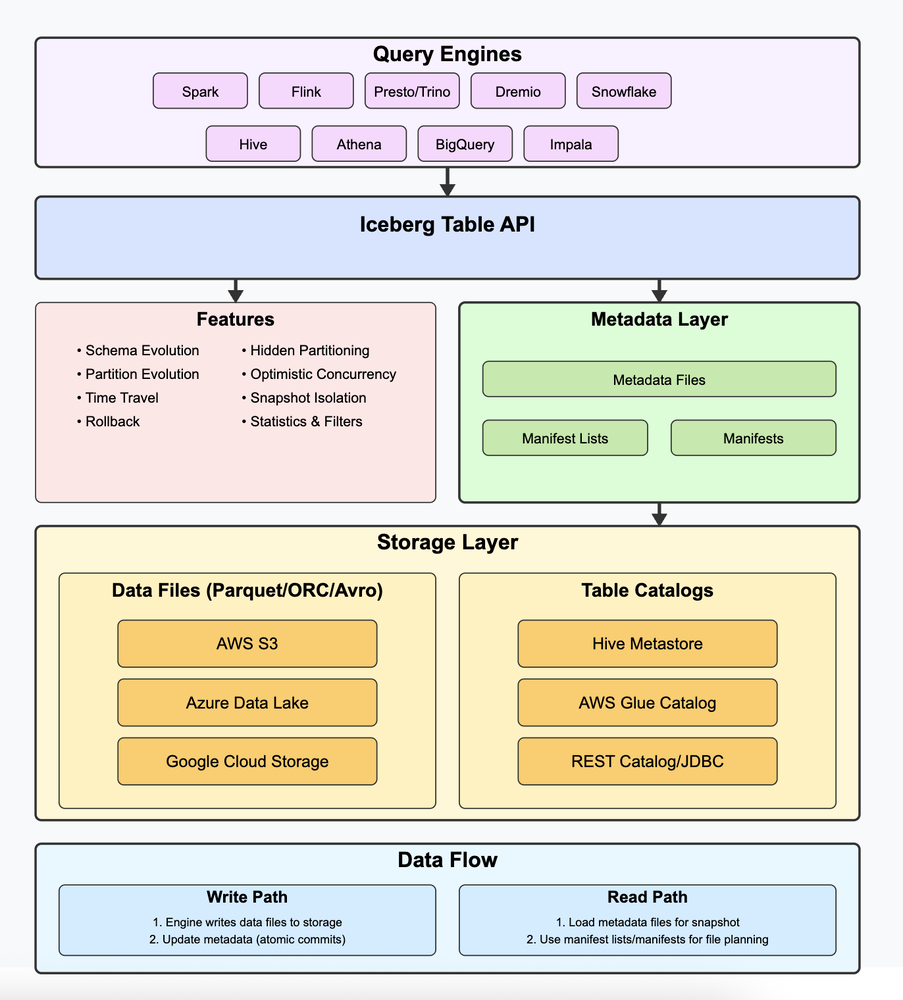
Iceberg sits between the query engines and the files in storage. Here is how the pieces fit together:
- Table API: query engines like Spark, Flink, Trino, and others all talk to Iceberg through this one common API. It supports features like schema evolution, time travel, snapshot isolation, and safe concurrent writes.
- Metadata layer: tracks table schemas, snapshots, and file-level stats, so engines avoid scanning entire directories.
- Manifests and manifest lists: help plan exactly which files to read.
- Data files: the actual data is stored in Parquet, ORC, or Avro files on cloud storage like S3, Azure Data Lake, or GCS.
- Table catalogs: Hive, Glue, and REST catalogs help locate and register tables.
Data moves through those pieces along two paths:
- Write: Iceberg first writes data files to the object store. It then performs an atomic commit to update the metadata with a new snapshot.
- Read: Iceberg loads the latest snapshot metadata, then uses manifest lists to find the relevant manifest files. From there it pinpoints the exact data and delete files to scan. Queries stay fast and consistent because they never touch unnecessary data.
How Apache Iceberg Stores Data
In Apache Iceberg, the metadata layer is the core of how tables are managed. It tracks the table schema, snapshots, partition specs, and file-level statistics. That is what keeps queries fast, reliable, and versioned without scanning entire directories.
This metadata is stored as files (JSON and Avro) in the table's storage location, usually a cloud object store like Amazon S3, Azure Data Lake Storage, or Google Cloud Storage. Iceberg works with multiple catalogs to track table locations, such as Hive Metastore, AWS Glue, or a custom REST catalog.
Iceberg Table Structure
iceberg/
├── metadata/
│   ├── v1.metadata.json        ← Schema + snapshots
│   ├── snap-1.avro             ← Points to manifest list
│   └── manifest-1.avro         ← Tracks data + delete files
└── data/
    ├── data-file-1.parquet     ← Actual row data
    └── delete-file-1.parquet   ← Equality deletes
📂 metadata/ folder, Controls table structure and versioning
- v1.metadata.json : This is the core metadata file for the Iceberg table. It defines the table schema, partition specification, snapshot history, and table properties. Think of it as the table's control center, tracking the current state and all changes over time.
- snap-1.avro : Also known as the manifest list, this file represents a snapshot, a point-in-time view of the table. It lists all the manifest files included in the snapshot, along with basic stats like the number of added or deleted files. This file acts like an index of all files used in a specific snapshot.
- manifest-1.avro : The manifest file contains metadata for each data and delete file used in a snapshot. It includes file paths, row counts, partition values, column-level stats (min/max), and file types (data or delete). This is where Iceberg tracks individual files and their statistics.
📂 data/ folder, Stores actual table content
- data-file-1.parquet : A Parquet (or ORC/Avro) file containing the actual records of your table. It holds the columnar data that query engines read during scans. This is the real data that you query.
- delete-file-1.parquet : A special file that stores row-level delete information. Iceberg supports two types of deletes:
- Equality deletes: e.g., WHERE id = 1001
- Position deletes: e.g., "delete row #5 in data-file-1". This allows Iceberg to logically delete rows without rewriting entire data files.
Human-readable representation of Parquet/Avro file
v1.metadata.json
{
  "format-version": 2,
  "current-snapshot-id": 123456,
  "schema": {
    "fields": [
      { "id": 1, "name": "id", "type": "int" },
      { "id": 2, "name": "name", "type": "string" }
    ]
  },
  "snapshots": [
    {
      "snapshot-id": 123456,
      "manifest-list": "snap-1.avro",
      "timestamp-ms": 1700000000000
    }
  ]
}
snap-1.avro
[
  {
    "manifest_path": "manifest-1.avro",
    "added_files_count": 1,
    "deleted_files_count": 0
  }
]
manifest-1.avro
[
  {
    "file_path": "/data/data-file-1.parquet",
    "partition": { "country": "US" },
    "file_type": "data",
    "row_count": 1000,
    "column_stats": {
      "id": { "min": 1, "max": 1000 }
    }
  },
  {
    "file_path": "/data/delete-file-1.parquet",
    "file_type": "delete",
    "delete_type": "equality"
  }
]
data-file1.parquet
+----+-------+---------+
| id | name  | country |
+----+-------+---------+
| 1  | Alice | US      |
| 2  | Bob   | CA      |
+----+-------+---------+
delete-file-1.parquet
+----+
| id |
+----+
| 2  |
+----+
How Reads Work in Apache Iceberg
- Reads the latest metadata.json: This file acts as the control center, pointing to the current snapshot and containing table schema, partition spec, and configuration.
- Identifies the current snapshot: Each snapshot represents a consistent view of the table at a point in time.
- Loads the corresponding manifest list (snap-x.avro): This file lists all the manifest files that are part of the snapshot.
- Loads manifest files: These contain metadata about individual data and delete files, including partition info, row counts, and min/max column values.
- Filters out irrelevant files using partition pruning and column stats, avoiding full directory scans.
- Applies delete files at read-time: Iceberg supports both equality and position deletes. These are applied logically during the read process, without modifying the base data files.
- Returns a consistent, up-to-date view: Readers only see data files that are part of the current snapshot, ensuring correctness.
Why Reads and Writes Are Safe in Iceberg
All operations in Iceberg are versioned, file-based, and immutable. When a write happens:
- New data and delete files are written first.
- A new metadata.json file is created referencing a new snapshot.
- The commit is done atomically (using optimistic concurrency).
- Readers always see a consistent snapshot, they never access partially-written or in-progress data.
This design enables safe, concurrent reads and writes, even on cloud object stores like Amazon S3, Azure Data Lake, or GCS, which don't support file locking or traditional transactions.
Trino + Iceberg: Query Everything, From Data Lakes to Databases
Trino is a distributed SQL query engine that can query data across many different systems through a single interface. For Apache Iceberg, Trino has native support.
You can run fast queries on Iceberg tables stored in S3, ADLS, or GCS, with full support for features like schema evolution, hidden partitioning, and time travel.
What makes Trino even more flexible is that it's not limited to just Iceberg.
You can use Trino to join data across a wide range of sources, from Hive and Delta Lake to traditional RDBMSs like PostgreSQL, MySQL, SQL Server, and Oracle, to cloud data warehouses like BigQuery, Redshift, and Snowflake. It even supports NoSQL databases like Cassandra and MongoDB.
This means you can, for example, join an Iceberg table from S3 with customer data in PostgreSQL and logs in Kafka, all using standard SQL. With Trino, your data stays where it is, and Trino brings the compute to it.
Let's say you have the following datasets:
- **Iceberg table**: iceberg.sales.transactions (stored in S3, cataloged in Iceberg)
- **PostgreSQL table**: postgresql.crm.customers (customer info from your CRM DB)SELECT
c.customer_id,
c.name,
c.email,
t.transaction_id,
t.amount,
t.transaction_date
FROM
postgresql.crm.customers AS c
JOIN
iceberg.sales.transactions AS t
ON
c.customer_id = t.customer_id
WHERE
t.transaction_date >= DATE '2025-01-01'
ORDER BY
t.transaction_date DESC;Together, Iceberg and Trino transform messy data lakes into scalable, query-ready data platforms without moving your data.
When to Choose Iceberg
| If You Need | Consider | Why |
|---|---|---|
| Open table format, widest engine support | Apache Iceberg | Works with Spark, Flink, Trino, and more. Strongest schema and partition evolution. |
| Tight Spark integration, Databricks ecosystem | Delta Lake | Best experience inside Databricks, solid OSS support via delta-rs |
| CDC and incremental processing pipelines | Apache Hudi | Built-in upsert and delete support, better fit for streaming CDC workloads |