Passwordless Authentication's Silent Choice: Trust vs Privacy
Security keys promise protection from phishing and password breaches. But every time they're used, a silent decision is being made about what websites can learn about users. Most people have no idea this is happening.
The future of authentication isn't just about being more secure. It's about who gets to know what devices people own, where they use them, and how digital identities can be tracked across the internet.
The Promise and the Problem
FIDO2 promised to end the password era. It consists of two main components:
• WebAuthn (Web Authentication API): The browser standard that websites use to communicate with authenticators • CTAP (Client to Authenticator Protocol): How browsers and operating systems talk to external security keys via USB, NFC, or Bluetooth
When using a passkey or security key, the setup involves FIDO2. The website talks to the browser via WebAuthn, and if using an external security key, the browser talks to that key via CTAP.
But here's what the marketing materials don't tell people: this "passwordless future" comes with surveillance capabilities that make cookies look primitive.
How WebAuthn Works
WebAuthn replaces passwords with public key cryptography. Instead of sharing a secret (password) with a website, you prove you control a private key without ever revealing it. Here's the basic flow:
Registration: The authenticator creates a unique key pair for each website. The public key goes to the website, the private key stays on the device.
Authentication: The website sends a challenge, the authenticator signs it with the private key, and the website verifies the signature with the stored public key.
The magic is that each key pair is bound to a specific website domain, making phishing nearly impossible.
This sounds perfect. So what's the catch?
The Catch: Devices Have Digital Fingerprints
WebAuthn powers passkeys and security keys with phishing-proof logins. But every authenticator carries a digital birth certificate that can reveal exactly what device you're using and when it was manufactured.
When registering a passkey or hardware security key, the authenticator can send attestation: a cryptographically signed statement that proves "I am a genuine YubiKey 5C NFC manufactured in batch #4A7B2 on March 15th, 2023."
For banks and enterprises, this is gold: they can whitelist only approved devices and block everything else. For privacy advocates, it's a nightmare: the security key becomes a permanent, unforgeable tracking beacon that follows users across the internet.
How WebAuthn Registration Actually Works
Here's what happens when you register a new passkey:
- Site requests registration: The website asks the browser to create a new credential
- Authenticator generates keys: A public-private key pair is created (private key never leaves the device)
- Attestation decision: The authenticator decides whether to include attestation data
- Registration response: The authenticator sends back the public key, credential ID, and optionally attestation
- Site stores credential: The website saves the public key and any attestation information
The critical moment is step 3. This is where privacy gets traded for verifiable trust.
Without attestation, the site can't cryptographically verify the device's origin. Instead, it trusts what the browser and operating system report during the WebAuthn process.
This is self-reported information that could be spoofed in open environments. But on locked-down platforms like Apple's iOS/macOS, it's enforced by the OS and hardware.
Platform vs. Roaming Authenticators Without Attestation
| Feature | Apple Platform Authenticator (Face ID / Touch ID passkeys) | YubiKey / Roaming Hardware Key |
|---|---|---|
| Where the trust comes from (no attestation) | The OS + Secure Enclave security chain. Browser calls system APIs that directly talk to Secure Enclave. Platform enforces key storage and usage rules. | The device itself. The private key is generated and stored inside YubiKey's secure element. No OS trust chain; works on any machine. |
| What the site can prove without attestation | Nothing cryptographic about the hardware. It only knows "this browser says it's a platform authenticator." Relies on trusting Apple's platform security. | Nothing cryptographic about the brand/model. It only knows "this is a FIDO2-compliant authenticator." Relies on trusting FIDO2 protocol rules. |
| Key isolation | Keys live in Secure Enclave; never leave the chip; OS mediates all access. | Keys live in YubiKey's secure element; never leave the device; direct hardware enforcement. |
| Phishing resistance without attestation | Strong; keys are bound to the site's domain, can't be used by phishing sites. | Strong; same binding; phishing sites can't use the key for other domains. |
| What attestation adds | Proof to the site that this authenticator is genuine Apple hardware (mainly in enterprise/MDM flows). | Proof to the site that this authenticator is a genuine YubiKey of a specific model/batch. |
| Privacy trade-off if attestation enabled | Site learns it's a specific Apple device model (rare in consumer flows). | Site learns exact YubiKey model and manufacturing batch (common if attestation requested). |
Most consumer services never request attestation. Apple and Google's platform authenticators default to no attestation for privacy.
But many hardware keys will reveal their model ID if the browser doesn't zero it out. If you approve attestation, the site gets a signed proof that can be used for both trust and tracking.
Privacy Concerns When Attestation is Required
When a website requires attestation, several privacy issues emerge:
Cross-site tracking: A YubiKey 5C NFC with serial number batch #4A7B2 becomes a unique identifier. If Bank A and Shopping Site B both require attestation, they can potentially link accounts by correlating this hardware fingerprint.
Device profiling: Enterprise sites requiring attestation can build profiles of hardware. They learn about specific iPhone models, MacBook versions, or exact security key models. This creates a detailed picture of digital habits.
Behavioral correlation: Sites can track device usage patterns. If the same YubiKey is used for work and personal accounts, and both require attestation, employers could theoretically identify personal browsing if data gets shared.
Long-term tracking: Unlike cookies that can be deleted, hardware attestation creates permanent identifiers. A security key's attestation signature remains the same across all sites and time periods.
Think about it: cookies expire, browsers can be cleared, VPNs can mask IP addresses.
But the YubiKey's attestation signature? That's permanent and unforgeable. It's the perfect tracking mechanism disguised as a security feature.
Real-World Scenarios: When Attestation Matters
Banking scenario: A major bank requires attestation for all logins. They maintain an allowlist of approved security keys and will reject any unrecognized devices.
When registering a YubiKey, they know it's genuine hardware. But they also know the exact device model and can track it across different accounts users might have with them.
Enterprise scenario: A company deploys managed devices with platform authenticators. They use attestation to ensure only company-issued iPhones and MacBooks can access corporate systems.
Employees get strong security. But the company can correlate which specific device accessed which systems at what times.
Consumer scenario: Most consumer sites like Google, GitHub, or social media platforms don't request attestation. They prioritize user privacy over device verification. They know users are using "some FIDO2 device" but can't fingerprint specific hardware.
Mixed environment: Using the same YubiKey for work (requires attestation) and personal accounts (no attestation).
Employers could theoretically identify personal browsing patterns if they ever gained access to attestation data from consumer sites. That would require significant data sharing that's unlikely in practice.
The scariest part? Most of this happens without user knowledge or consent. When a website "requires attestation," they're not asking for permission to fingerprint devices; they're just doing it.
The Uncomfortable Truth
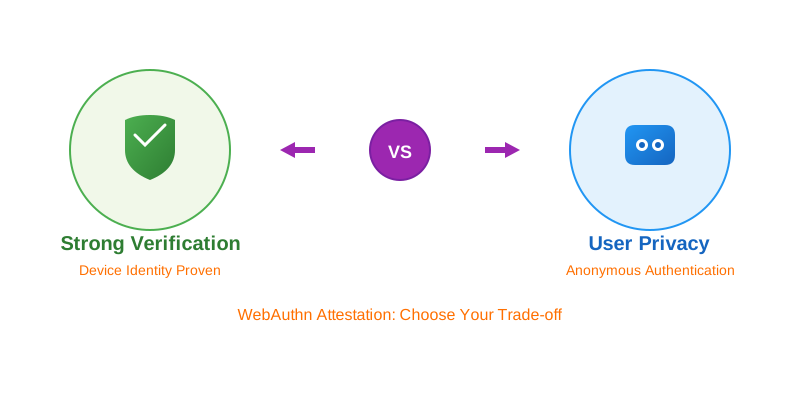
- Accept attestation: devices become permanent tracking beacons, but organizations trust the hardware
- Reject attestation: privacy is preserved, but the ability to prove device authenticity is lost
Here's what's really uncomfortable: users rarely get to make this choice. Websites decide whether to demand attestation, browsers decide whether to provide it, and manufacturers decide what information to include. Users are just along for the ride.
What This Means
The good news: most consumer sites don't request attestation. Google, GitHub, social media platforms have chosen privacy over device verification.
The concerning news: the infrastructure for permanent hardware tracking is already built and deployed. It's just waiting for someone to flip the switch.
As we rush toward a passwordless future, we might be trading the inconvenience of passwords for something far more invasive: devices that can never lie about who they are, where they've been, or who owns them.
The question isn't whether this technology will be misused. It's when, and whether users will have any say in the matter.
WebAuthn remains one of the strongest authentication technologies available. But the next time someone promises a "passwordless future," it's worth asking: what else is being given up besides passwords?