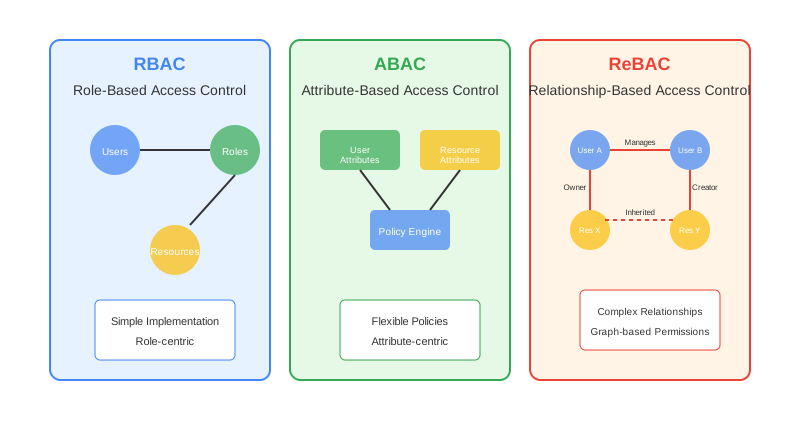
Securing Access: The Power of RBAC, ABAC, and ReBAC
RBAC, ABAC, and ReBAC come up in every authorization conversation, but applying them correctly trips people up. Here's how each model works and when to use it.
👥 Role-Based Access Control (RBAC)
RBAC is one of the most widely used access control models. It assigns permissions to users based on their roles within an organization. This simplifies management by grouping users into roles and assigning permissions to those roles rather than individual users.
Let's say we want at least one person who can add new users, delete users, and perform various other administrative tasks. We could list out these permissions for this one person. This pattern is called an Access Control List, or ACL.
The problem shows up later. If we expect to give these same permissions to another person in the future, we would need to list them all over again.
Instead, we can group these permissions into a single role, give that role a name, say Admin, and assign that role to the people responsible for these tasks.
Any future user who needs these administrative permissions can simply be assigned the Admin role. That keeps the process simple and consistent.
RBAC breaks down when you need fine-grained access control. Permissions are tied to roles, and requirements that don't fit existing roles force you to create increasingly specific roles, leading to role explosion.
Example Roles and Permissions
Roles:
- LeadCreator
- VendorCreator
- VendorApprover
- CustomerSupport
- Administrator
Permissions:
- LeadCreator: Create and update lead information, assign leads to sales representatives.
- VendorCreator: Add and manage vendor information, track vendor interactions.
- VendorApprover: Approve or reject new vendor requests, oversee vendor compliance.
- CustomerSupport: Access and update customer information, resolve customer issues, and track support tickets.
- Administrator: Full access to the system, including managing roles and permissions.
🧠 Attribute-Based Access Control (ABAC)
ABAC manages access to resources by using the attributes of users, resources, and the environment. This model makes access decisions that react to context, which gives you flexible and fine-grained control.
ABAC controls access by evaluating a set of attributes associated with the user (subject), the resource, the action, and the environment.
Unlike RBAC, which assigns permissions based on static roles, ABAC can make access decisions based on a combination of dynamic factors. That allows for more nuanced and precise control.
ABAC is a superset of RBAC. Whereas RBAC is a flat 2D model that maps roles to a set of permissions, ABAC is multi-dimensional.
So to implement an ABAC system, we need an interface that helps us express a broader variety of rules about who can do what. Specifically, we need one that lets us map both attributes on the user and attributes on the resource.
A key component of ABAC is the policy engine, which evaluates access requests against defined policies based on attributes. This is done by expressing authorization logic using a policy language and evaluating it over the relevant input data.
To achieve this, the policy engine requires all necessary parameters to be included in the access request or fetched from a persistent store. This way, we can write fine-grained rules that determine what data the user is authorized to see, based on the input data.
Keeping the authorization logic separate from business logic gives us a single place to manage access rules. That makes it easier to maintain and audit.
Sample ABAC Rule
rule: Lead Access
description: Allow the creator of the leads, their manager, and the manager's reportees to access lead details
when:
  - containsAnyIgnoreCase({"SalesRep", "SalesManager"}, sub["role"])
  - res["type"] == "Lead"
  - action["id"] == "read" || action["id"] == "update"
  - res["created_by"] == sub["id"] || res["created_by"] == managerOf(sub["id"]) || res["created_by"] == reporteeOf(managerOf(sub["id"]))
  - env["access_level"] == "enterprise"
then:
- decision = permitSubject: The user requesting access, whose role must be either "SalesRep" or "SalesManager."
Resource: The type of resource must be a "Lead."
Action: The actions permitted are "read" or "update."
Environment: The user's access level must be "enterprise."
Decision: Access is granted if the lead was created by the user, the user's manager, or a reportee of the user's manager.
🏛 Relationship-Based Access Control (ReBAC)
ReBAC derives permissions based on the relationships between users and resources, rather than roles or attributes alone. This makes ReBAC particularly suited for complex scenarios involving dynamic and nested relationships.
Google uses Zanzibar (https://research.google/pubs/zanzibar-googles-consistent-global-authorization-system/), which is based on ReBAC, for all its services.
SpiceDB (https://github.com/authzed/spicedb) is an open-source implementation inspired by Google Zanzibar, designed to support ReBAC in various applications. It lets developers define and enforce fine-grained access control policies using a relationship-based model.
In ReBAC, relationships and permissions are stored within the system (e.g., SpiceDB) as relationship tuples. These tuples define who can do what with which resources based on their relationships.
When an access request is made, SpiceDB evaluates the existing relationships and permissions to decide if access should be granted. A policy engine requires all parameters to be included in the request. SpiceDB does not, because it uses its internal database to fetch and evaluate the data it needs.
Key Terms and Terminology in SpiceDB
Object: An entity in the system to which access is controlled. Examples include documents, folders, and users.
Relation : Defines a specific type of relationship between objects. For example, a document can have owner, reader, and banned relations.
Permissions: Derived from relations, permissions specify what actions a user can perform on an object. They are often defined using logical expressions involving relations.
Caveat : Additional conditions or constraints that must be met for a permission to be granted. These can involve external factors or more complex logic.
definition user {}

definition document {
    relation reader : user
    relation owner : user
    relation banned : user
    relation signed_tos : user

    permission view : ((reader + owner) - banned) & signed_tos with caveat {
        condition: {
            time_based_access: { start_time: "09:00", end_time: "17:00", timezone: "UTC" }
        }
    }
    permission edit : (owner - banned) & signed_tos with caveat {
        condition: {
            time_based_access: { start_time: "09:00", end_time: "17:00", timezone: "UTC" }
        }
    }
    permission delete : (owner - banned) & signed_tos with caveat {
        condition: {
            time_based_access: { start_time: "09:00", end_time: "17:00", timezone: "UTC" }
        }
    }
}
This SpiceDB rule defines a document object. Here is what each part does:
- Relations: reader, owner, banned, and signed_tos describe the different ways a user can be associated with the document.
- view: granted to users who are either readers or owners, provided they are not banned and have signed the terms of service (signed_tos).
- edit and delete: restricted to owners who are not banned and have signed the terms of service.
- Caveat: every permission also carries a condition that allows access only between 09:00 and 17:00 UTC.
So matching the relationship criteria is not enough on its own. A user must also meet the time-based condition to perform the action.
Selection Guide
| If You Need | Consider | Why |
|---|---|---|
| Simple role-based permissions | RBAC | Easy to implement, works well when access maps cleanly to organizational roles |
| Fine-grained, context-aware policies | ABAC | Evaluates attributes dynamically (user, resource, environment, action). Superset of RBAC. |
| Permissions based on object relationships | ReBAC | Natural fit for social graphs, file sharing, nested org hierarchies. See Google Zanzibar. |